

Switching Video Frame is an interactive VAST Premium template, featuring up to 5 sets of branded background and foreground overlays, each with their own click URL, to be wrapped around a VAST video and served as pre-roll.


Examples
Assets
Video
MP4 - (1920x1080 or similar - 16:9 aspect ratio). Max 30 seconds, max file size 50mb.
Supported VAST Versions
This template requires VAST 4.3+ with SIMID enabled. The creative calls requestResize(...) to carve out and maintain a custom video window while the surrounding artwork and interactive states switch, so it depends on the stricter resize/rendering behaviour used for non-standard framed executions.
The controller can interoperate with SIMID protocol versions 1.0.0, 1.0.1, 1.1.0, and 1.2.0, subject to player support, but the template should be trafficked against environments that satisfy the stricter resize/rendering expectations associated with VAST 4.3+.
Buttons
Minimum 2, Maximum 5.
PNG/WEBP/SVG/JPG 300x175 or similar, max 250kb each.
The buttons will be scaled to fit in the available space to the right side of the video, and will be spaced evenly to use all the available space. Depending on the number of buttons you need, they can be taller or shorter as necessary in order to use all the available space, as illustrated below. For best results export button assets without any excess white space, ensuring they appear as large as possible.
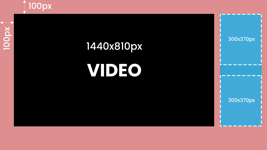
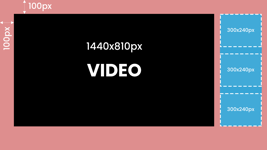
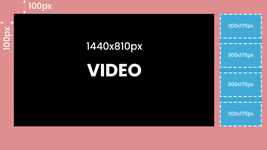
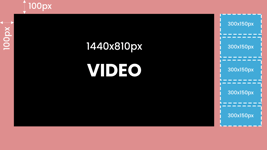
Backgrounds
Minimum 2, Maximum 5.
JPG/WEBP, 1920x1080, max 250kb each.
The background will appear behind the video, and can animate subtly.
Foreground (Overlay)
Minimum 2, Maximum 5.
PNG/WEBP with transparent background, 1920x1080, max 250kb
The foreground will appear in front of the video, and can be static or animate subtly.
Use the below diagram to help you design your foreground and background assets:
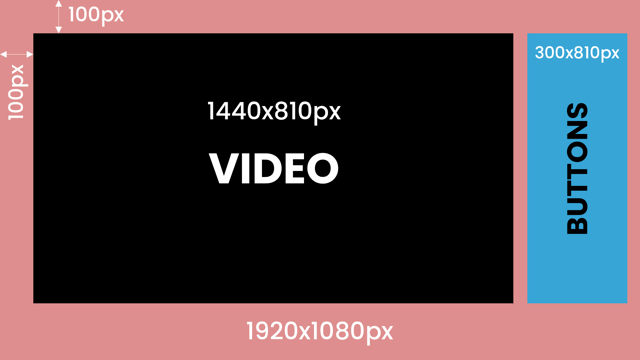
Format description and guidance
Under the main creative parameters, upload your video and add the Click URL (where you will send people who click anywhere on the ad).
Under the overlay section, you can choose the animations of the backgrounds and foregrounds on transitioning, selecting between either zoom-in, zoom-out, fade-in effects, or no animation.
For each product that you want to use, upload a button, a background, a foreground, and optionally add a click url.
Safe Zones
As VAST content is typically delivered inside a publisher's video player, various UI elements (such as play/pause & volume controls) may appear on top of the creative. For this reason, avoid placing any text or logos within 160px of the bottom on the left and right corners of the creative.
Audio
Yes
Template Details
VAST Premium - Switching Video Frame
General
| Parameter | Purpose | Default |
|---|---|---|
| Background Animation | Select the background animation option from the list to control how the template behaves. | zoom out | choices: zoom in, zoom out, none |
| Foreground Animation | Select the foreground animation option from the list to control how the template behaves. | none | choices: slide in top, slide in bottom, slide in left, zoom out, fade in, none |
Product 1
| Parameter | Purpose |
|---|---|
| Background Image 1 | Upload the background image 1 asset (JPG, PNG, or WEBP). Follow safe-zone guidance and stay within the platform file-size limits. |
| Foreground Overlay 1 | Upload the overlay asset (JPG, PNG, or WEBP). Overlays render with object-fit: contain, so they will not crop and do not require extra safe-zone padding. |
| Button Image 1 | Upload the button image 1 asset (JPG, PNG, or WEBP). Follow safe-zone guidance and stay within the platform file-size limits. |
| Product URL 1 | Destination URL triggered when the user interacts with this element. Include https:// and any tracking parameters. |
Product 2
| Parameter | Purpose |
|---|---|
| Background Image 2 | Upload the background image 2 asset (JPG, PNG, or WEBP). Follow safe-zone guidance and stay within the platform file-size limits. |
| Foreground Overlay 2 | Upload the overlay asset (JPG, PNG, or WEBP). Overlays render with object-fit: contain, so they will not crop and do not require extra safe-zone padding. |
| Button Image 2 | Upload the button image 2 asset (JPG, PNG, or WEBP). Follow safe-zone guidance and stay within the platform file-size limits. |
| Product URL 2 | Destination URL triggered when the user interacts with this element. Include https:// and any tracking parameters. |
Product 3
| Parameter | Purpose |
|---|---|
| Background Image 3 | Upload the background image 3 asset (JPG, PNG, or WEBP). Follow safe-zone guidance and stay within the platform file-size limits. |
| Foreground Overlay 3 | Upload the overlay asset (JPG, PNG, or WEBP). Overlays render with object-fit: contain, so they will not crop and do not require extra safe-zone padding. |
| Button Image 3 | Upload the button image 3 asset (JPG, PNG, or WEBP). Follow safe-zone guidance and stay within the platform file-size limits. |
| Product URL 3 | Destination URL triggered when the user interacts with this element. Include https:// and any tracking parameters. |
Product 4
| Parameter | Purpose |
|---|---|
| Background Image 4 | Upload the background image 4 asset (JPG, PNG, or WEBP). Follow safe-zone guidance and stay within the platform file-size limits. |
| Foreground Overlay 4 | Upload the overlay asset (JPG, PNG, or WEBP). Overlays render with object-fit: contain, so they will not crop and do not require extra safe-zone padding. |
| Button Image 4 | Upload the button image 4 asset (JPG, PNG, or WEBP). Follow safe-zone guidance and stay within the platform file-size limits. |
| Product URL 4 | Destination URL triggered when the user interacts with this element. Include https:// and any tracking parameters. |
Product 5
| Parameter | Purpose |
|---|---|
| Background Image 5 | Upload the background image 5 asset (JPG, PNG, or WEBP). Follow safe-zone guidance and stay within the platform file-size limits. |
| Foreground Overlay 5 | Upload the overlay asset (JPG, PNG, or WEBP). Overlays render with object-fit: contain, so they will not crop and do not require extra safe-zone padding. |
| Button Image 5 | Upload the button image 5 asset (JPG, PNG, or WEBP). Follow safe-zone guidance and stay within the platform file-size limits. |
| Product URL 5 | Destination URL triggered when the user interacts with this element. Include https:// and any tracking parameters. |