
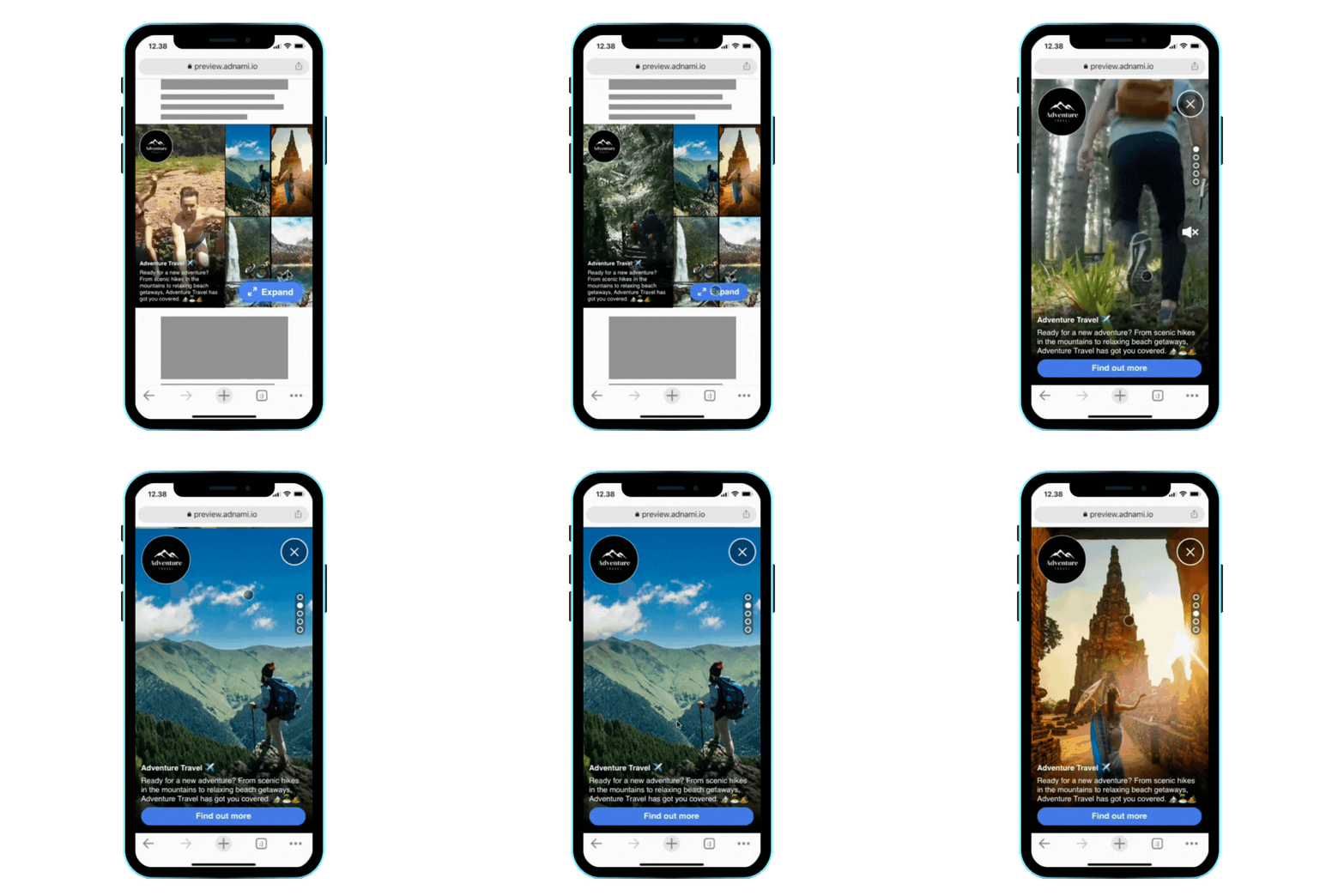
A responsive template for standard display, that allows for the easy creation of a reel style creative. This format is designed to be an easy way to utilise "vertical video reel" style assets and features an expanding carousel, allowing users to swipe through up to 5 pieces of content.
The template can adapt to fit most standard display sizes, simply change the width and height to the dimensions required.
| Unexpanded View | Expanded View |
| | |
-png.png?width=178&height=356&name=preview-adnami-io_pv_guid=64df1d7a-27e4-42cd-b4ab-10c42bfcfde2%20(1)-png.png)
-png.png?width=178&height=356&name=preview-adnami-io_pv_guid=64df1d7a-27e4-42cd-b4ab-10c42bfcfde2%20(2)-png.png)
Example
Assets
Content Assets
Up to 5 Videos or Images — 1080x1920 (9:16) MP4,JPG, WEBP, PNG
For best results, avoid placing important content close to the very top or bottom of the assets, as these may be cropped or obscured by other elements. The template supports a maximum of 5 assets, and a minimum of 2 assets.
Logo
Image — 400x400 (1:1) JPG, PNG, WEBP or SVG
The logo will be cropped to a circle, so ensure it is scaled appropriately.
Brand Name
Short text field intended for adding the name of a brand.
Text - 25 chars Max
Headline Text
Longer text field that appears at the bottom of the creative. Intended for a short message or offer headline.
Text - 65 chars Max.
Expand Button
Button that appears on the unexpanded creative, prompting users to expand the creative.
Text - 15 chars Max.
CTA Button
Button that appears on the expanded creative, prompting users to click through to your landing page.
Text - 25 chars Max.
Format description and guidance
In the unexpanded view, all of the assets will be displayed side-by-side in a responsive grid. Asset 1 will always be the most prominent. The format is expanded by tapping on any of the assets (which will launch the carousel and jump to the selected asset), or by tapping the expand button (which will show the carousel, focused on the first asset).
For video assets, an audio button will be added to the right side, to allow users to unmute videos within the carousel.
Within the unexpanded view, all assets will be scaled using the "cover" scaling mode. Within the fullscreen carousel, the scaling mode can be customised to either:
- cover - stretches the asset to cover the entire screen, avoiding any empty space, but resulting in cropping
- contain - scales assets to fit entirely within the screen, potentially leaving empty space around the edges
- fit to width - scales assets to be 100% of the screen width, with potential cropping or empty space at the top and bottom
The swipe direction of the carousel can also be customised, allowing for either a horizontal (navigated by swiping left + right) or vertical (navigated by swiping up + down) style carousel.
An expand button will appear on the unexpanded creative, and a cta button is visible on the expanded creative - the text and colour can be customised.
Max total file weight
Video: Files up to 50 MB are accepted, with a recommended maximum length of 20 seconds.
Image: Maximum 200kb.
Click tags and tracking
The template supports up 6 separate clickURLs — one for each content asset, and a default one for the main creative.
Audio
User initiated.
Template Details
Mosaic Reel with Steaming Video
General
| Parameter | Purpose | Default |
|---|---|---|
| 0.0 Default Click URL | Destination URL triggered when the user interacts with this element. Include https:// and any tracking parameters. | |
| 0.1 Background Colour | Hex colour (#RRGGBB or #RRGGBBAA) applied to this element. Use it to match brand palettes and overlay blends. | #000000 |
| 1.0 Asset 1 (Image) | Upload the 1.0 asset 1 (image) asset (JPG, PNG, or WEBP). Follow safe-zone guidance and stay within the platform file-size limits. | |
| 1.0 Asset 1 (Video) | Provide the 1.0 asset 1 (video) video in MP4 or WEBM format, encoded for autoplay and kept under the maximum weight. | |
| 1.1 Click URL 1 | Destination URL triggered when the user interacts with this element. Include https:// and any tracking parameters. | |
| 2.0 Asset 2 (Image) | Upload the 2.0 asset 2 (image) asset (JPG, PNG, or WEBP). Follow safe-zone guidance and stay within the platform file-size limits. | |
| 2.0 Asset 2 (Video) | Provide the 2.0 asset 2 (video) video in MP4 or WEBM format, encoded for autoplay and kept under the maximum weight. | |
| 2.1 Click URL 2 | Destination URL triggered when the user interacts with this element. Include https:// and any tracking parameters. | |
| 3.0 Asset 3 (Image) | Upload the 3.0 asset 3 (image) asset (JPG, PNG, or WEBP). Follow safe-zone guidance and stay within the platform file-size limits. | |
| 3.0 Asset 3 (Video) | Provide the 3.0 asset 3 (video) video in MP4 or WEBM format, encoded for autoplay and kept under the maximum weight. | |
| 3.1 Click URL 3 | Destination URL triggered when the user interacts with this element. Include https:// and any tracking parameters. | |
| 4.0 Asset 4 (Image) | Upload the 4.0 asset 4 (image) asset (JPG, PNG, or WEBP). Follow safe-zone guidance and stay within the platform file-size limits. | |
| 4.0 Asset 4 (Video) | Provide the 4.0 asset 4 (video) video in MP4 or WEBM format, encoded for autoplay and kept under the maximum weight. | |
| 4.1 Click URL 4 | Destination URL triggered when the user interacts with this element. Include https:// and any tracking parameters. | |
| 5.0 Asset 5 (Image) | Upload the 5.0 asset 5 (image) asset (JPG, PNG, or WEBP). Follow safe-zone guidance and stay within the platform file-size limits. | |
| 5.0 Asset 5 (Video) | Provide the 5.0 asset 5 (video) video in MP4 or WEBM format, encoded for autoplay and kept under the maximum weight. | |
| 5.1 Click URL 5 | Destination URL triggered when the user interacts with this element. Include https:// and any tracking parameters. | |
| 6.0 Logo | Upload the 6.0 logo asset (JPG, PNG, or WEBP). Follow safe-zone guidance and stay within the platform file-size limits. | |
| 6.1 Advertiser Name (Max 25 Chars) | Sets the 6.1 advertiser name (max 25 chars) value used in the creative. Supports plain text or CSS units where required. | |
| 6.2 Headline (Max 65 Chars) | Sets the 6.2 headline (max 65 chars) value used in the creative. Supports plain text or CSS units where required. | |
| 6.3 Expand Button Text | Copy displayed in the creative for this field. Keep it concise for readability on smaller screens. | Expand Reel |
| 6.3 CTA Button Text | Copy displayed in the creative for this field. Keep it concise for readability on smaller screens. | Find out more |
| 6.4 CTA Button Colour | Hex colour (#RRGGBB or #RRGGBBAA) applied to this element. Use it to match brand palettes and overlay blends. | #437CEA |
| 6.5 Expand Asset Scaling Mode | Select the 6.5 expand asset scaling mode option from the list to control how the template behaves. | fit to width | choices: cover, contain, fit to width |
| 6.6 Video Audio Controls | Select the 6.6 video audio controls option from the list to control how the template behaves. | Enabled | choices: Enabled, Disabled |
| 6.7 Carousel Direction | Select the 6.7 carousel direction option from the list to control how the template behaves. | Vertical | choices: Horizontal, Vertical |