
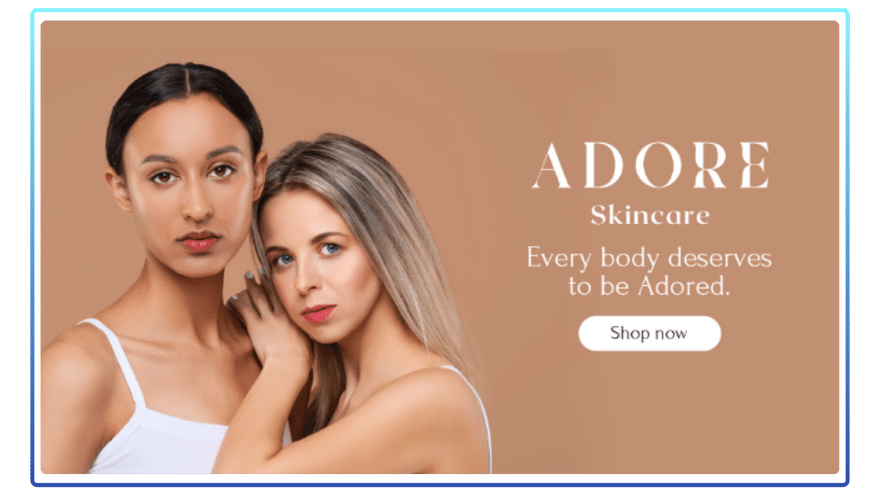
Examples
Recommended default creative dimensions
1920x1080px (16:9)
Safe zones
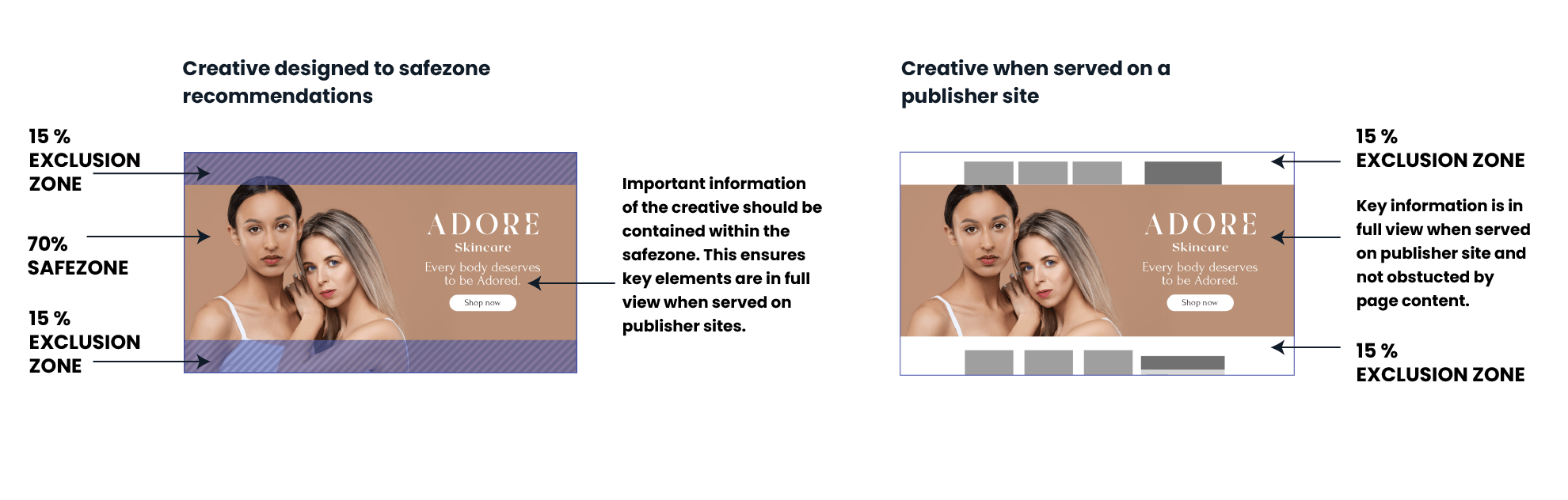
For image and video banners, we recommend allowing a 15% safe zone at the top and bottom of the asset, free of any essential elements (logos, messaging, cta etc) - See Safe Zone Tool.
Format description and guidance
This high impact format is a full-screen overlay, which covers the entire publisher page. A bar with a close button at the top of the screen allows users to hide the format, removing it from the page. The height and width of the creative can be configured, either covering the entire screen, or allowing a small portion of the page to be visible behind the banner.
The format supports either image, video or HTML5 banner types.
Top navigation bar styling
The top navigation bar now supports enhanced styling controls. You can set a dedicated navigation bar theme colour, add an optional navigation bar background image, and adjust the blur amount used in the glass effect.
Without a background image, the navigation bar uses a generated gradient treatment derived from the chosen theme colour, rather than displaying the colour as a flat solid fill. When a background image is uploaded, that image sits underneath the tinted glass layer, helping the ad label, continue text, and close control remain readable.
The navigation text and controls also automatically switch between white and black styling, depending on the final bar treatment, to maintain strong contrast and readability.
If you upload a top bar background image, use a wide panoramic crop and keep any important detail centred, as the image is scaled to cover the full bar width and may crop on different screens. Recommended upload size: at least 1920x120px.
The blur parameter can be used to increase or reduce how strongly the uploaded background image is blurred behind the bar styling, or set to none/zero to disable the blur effect altogether.
HTML banners should be built as responsive HTML5, that can adapt and resize to fit different screen sizes. For more information about building responsive creative, see our building responsive creative guide.
Max total file weight
3.5 MB.
For best performance, all assets should be compressed and optimized to the lowest possible file weight.
Animation
Maximum of 5 loops.
Maximum animation time 30 seconds (may vary by publisher).
Asset type
- Image: JPG
- Video: MP4
- HTML: Responsive HTML5 (either Adnami hosted by sharing a zip-file or served via 3rd party tags). HTML must be minified and optimized for polite load.
Click tags and tracking
For image or video banners, a click URL is added as part of the template setup. For HTML5 banners, see our clicktags and tracking guide.
To enable video tracking metrics, see our API for measuring VTR guide.
For creatives hosted using 3rd party tags, use the appropriate click methods and trackers for that provider examples.
Other Requirements
Do not link to any files or scripts hosted on external domains. All assets used should be included within the creative zip-file, or hosted on Adnami domains. Linking to resources on non-approved vendors may result in ads being blocked by Google Ads Manager and DV360.
Audio
User-initiated.
Template Details
Image
General
| Parameter | Purpose | Notes |
|---|---|---|
| Click Url | Destination URL triggered when the user interacts with this element. Include https:// and any tracking parameters. | |
| Image | Upload the image asset (JPG, PNG, or WEBP). Follow safe-zone guidance and stay within the platform file-size limits. | Required |
Image Settings
| Parameter | Purpose | Default |
|---|---|---|
| Scaling Mode | Sets the scaling behaviour of the image, determining whether it will appear cropped or not. | cover | choices: cover, contain, fit to width, fit to height, original size |
| Image Anchor Point | Controls how the image anchor point aligns inside the frame. Pick the focal point that keeps the subject in view. | mid-center | choices: top-left, top-center, top-right, mid-left, mid-center, mid-right, bot-left, bot-center, bot-right |
| Background Colour | Dependant on the scaling mode, this colour will be visible in the behind the if there is any empty space. | #00000000 |
Overlay 1
| Parameter | Purpose | Default |
|---|---|---|
| Asset | Upload the overlay asset (JPG, PNG, or WEBP). Overlays render with object-fit: contain, so they will not crop and do not require extra safe-zone padding. | |
| Width | Width of the overlay, use a responsive unit such as 'vw', 'vh', or '%' to ensure it scales with the banner. To derrive the width from the height, use 'auto'. | auto |
| Height | Height of the overlay, use a responsive unit such as 'vw', 'vh', or '%' to ensure it scales with the banner. To derrive the height from the width, use 'auto'. | 10% |
| Position | Position of the overlay, relative to the banner. For left & right positions, the horizontal offset can be modify to set the distance from the respective edge. Likewise for top & bottom positions, the vertical offset will be used. | top-center | choices: top-left, top-center, top-right, mid-left, mid-center, mid-right, bot-left, bot-center, bot-right |
Overlay 2
| Parameter | Purpose | Default |
|---|---|---|
| Asset | Upload the overlay asset (JPG, PNG, or WEBP). Overlays render with object-fit: contain, so they will not crop and do not require extra safe-zone padding. | |
| Width | Width of the overlay, use a responsive unit such as 'vw', 'vh', or '%' to ensure it scales with the banner. To derrive the width from the height, use 'auto'. | auto |
| Height | Height of the overlay, use a responsive unit such as 'vw', 'vh', or '%' to ensure it scales with the banner. To derrive the height from the width, use 'auto'. | 10vh |
| Position | Position of the overlay, relative to the banner. For left & right positions, the horizontal offset can be modify to set the distance from the respective edge. Likewise for top & bottom positions, the vertical offset will be used. | bot-center | choices: top-left, top-center, top-right, mid-left, mid-center, mid-right, bot-left, bot-center, bot-right |
Text Overlay
| Parameter | Purpose | Default |
|---|---|---|
| Text | Copy displayed in the creative for this field. Keep it concise for readability on smaller screens. | |
| Font Size | Define the font size using responsive CSS units (px, %, vw, vh) so it scales across screens. | 1vw |
| Position | Position of the overlay, relative to the banner. For left & right positions, the horizontal offset can be modify to set the distance from the respective edge. Likewise for top & bottom positions, the vertical offset will be used. | bot-center | choices: top-left, top-center, top-right, mid-left, mid-center, mid-right, bot-left, bot-center, bot-right |
| Text Colour | Hex colour (#RRGGBB or #RRGGBBAA) applied to this element. Use it to match brand palettes and overlay blends. | #ffffff |
| Font | Select the font option from the list to control how the template behaves. | sans-serif | choices: sans-serif, serif, monospace, impact |
Overlay Config
| Parameter | Purpose | Default |
|---|---|---|
| Vertical Offset | For top & bottom positioned overlays, the vertical offset will be used how far away from the top/bottom edges of the banner the asset will appear. | 12vh |
| Horizontal Offset | For left & right positioned overlays, the horizontal offset will be used how far away from the left/right edges of the banner the asset will appear. | 5vh |
Video Streaming
General
| Parameter | Purpose |
|---|---|
| Click URL | Destination URL triggered when the user interacts with this element. Include https:// and any tracking parameters. |
| Video Asset | Provide the video asset video in MP4 or WEBM format, encoded for autoplay and kept under the maximum weight. |
Video Settings
| Parameter | Purpose | Default |
|---|---|---|
| Max Video Stream Weight | Sets the maximum allowed video stream weight used when selecting available encodes. | 3.5mb | choices: 3.5mb, 3.0mb, 2.5mb, 2.0mb, 1.5mb, 1.0mb |
| Scaling Mode | Sets the scaling behaviour of the video. Letterbox and Pillarbox add space. Cover may crop. Contain avoids cropping. Original Size keeps intrinsic dimensions. | Letterbox | choices: Letterbox, Pillarbox, Cover, Contain, Original Size |
| Video Position | Anchor Point used to position the video within the banner. | mid-center | choices: top-left, top-center, top-right, mid-left, mid-center, mid-right, bot-left, bot-center, bot-right |
| Audio | Enables or disables video audio. | Enabled | choices: Enabled, Disabled |
| Audio Button Position | Sets the position of the audio control button. | top-right | choices: top-left, top-right, bot-left, bot-right |
Background Settings
| Parameter | Purpose | Default |
|---|---|---|
| Background Type | Selects how the background behind the video is generated (auto extraction, custom image, colour fill or blurred video). | Auto Background | choices: Auto Background, Custom Image, Custom Colour, Blurred Video |
| Background Image | Image used when Background Type is set to Custom Image. | |
| Background Colour | Colour used when Background Type is set to Custom Colour or to fill letterboxed areas. | #FFFFFF |
Endframe (optional)
| Parameter | Purpose | Default |
|---|---|---|
| Endframe Image | Image displayed for the endframe when enabled. | |
| Endframe Settings | Selects when the endframe appears relative to the video (before, after, both or disabled). | Disabled | choices: After Video, Before Video, Before and After video, Disabled |
| Endframe Display Order | Sets layering order: show endframe above overlays or overlays above endframe. | Endframe on top of overlays | choices: Endframe on top of overlays, Overlays on top of endframe |
Overlay 1 (optional)
| Parameter | Purpose | Default |
|---|---|---|
| Asset | Image asset for overlay 1. | |
| Width | Width of the overlay. Use responsive units (vw, vh, %) or 'auto'. | auto |
| Height | Height of the overlay. Use responsive units (vw, vh, %) or 'auto'. | 10vh |
| Position | Position of the overlay relative to the banner. | top-center | choices: top-left, top-center, top-right, mid-left, mid-center, mid-right, bot-left, bot-center, bot-right |
| Time - In (optional) | Video time (seconds) at which the overlay appears. | |
| Time - Out (optional) | Video time (seconds) at which the overlay hides. |
Overlay 2 (optional)
| Parameter | Purpose | Default |
|---|---|---|
| Asset | Image asset for overlay 2. | |
| Width | Width of the overlay. Use responsive units (vw, vh, %) or 'auto'. | auto |
| Height | Height of the overlay. Use responsive units (vw, vh, %) or 'auto'. | 10vh |
| Position | Position of the overlay relative to the banner. | bot-center | choices: top-left, top-center, top-right, mid-left, mid-center, mid-right, bot-left, bot-center, bot-right |
| Time - In (optional) | Video time (seconds) at which the overlay appears. | |
| Time - Out (optional) | Video time (seconds) at which the overlay hides. |
Text Overlay (optional)
| Parameter | Purpose | Default |
|---|---|---|
| Text | Text content displayed as overlay. | |
| Font Size | Font size of the text overlay (supports responsive units). | 1vw |
| Position | Position of the overlay relative to the banner. | bot-center | choices: top-left, top-center, top-right, mid-left, mid-center, mid-right, bot-left, bot-center, bot-right |
| Text Colour | Colour of the text overlay. | #ffffff |
| Font | Font family used for the text overlay. | sans-serif | choices: sans-serif, serif, monospace, impact |
| Time - In (optional) | Video time (seconds) at which the overlay appears. | |
| Time - Out (optional) | Video time (seconds) at which the overlay hides. |
Overlay Config
| Parameter | Purpose | Default |
|---|---|---|
| Vertical Offset | Vertical distance from the top or bottom edges for overlays positioned top or bottom. | 12vh |
| Horizontal Offset | Horizontal distance from the left or right edges for overlays positioned left or right. | 6vh |